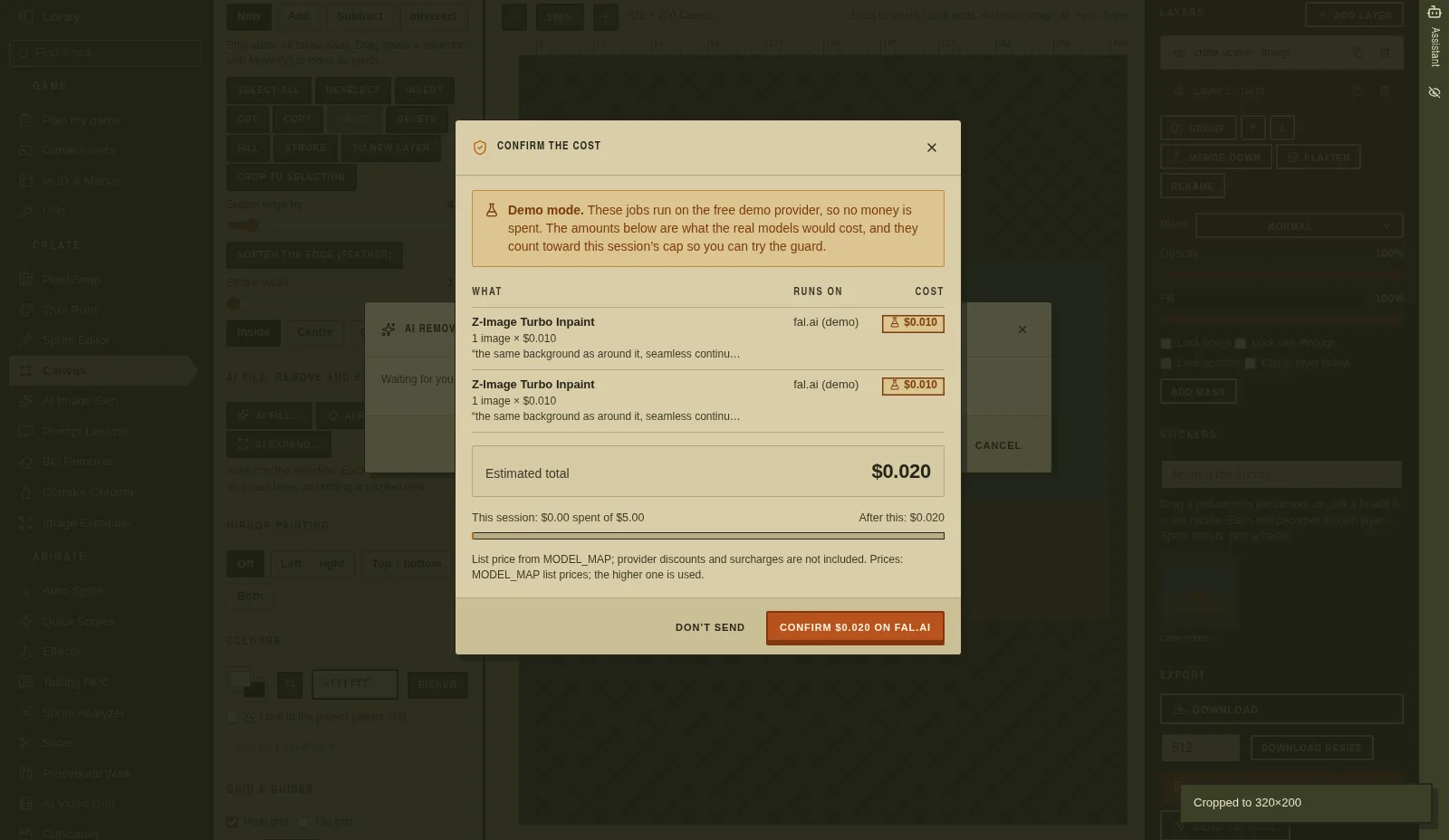
I've had the experience most people building with AI APIs have had: a script runs a bit longer than you meant it to, and the bill is the first you hear of it. I didn't want that to be possible here.
So the first rule went in on day one, before most of the tools existed. Nothing paid runs without a price on the button and a yes from me.
Day one: a confirm, a cap and a ledger
The foundation card (2 October) built a job queue where every paid call needs a confirm. It added a cost guard with a $5 session cap, and a ledger of what each job cost. It also added a fake provider, so every screen can be clicked through for $0. That fake provider is how most of the automated checks still run.
The same evening a routing card added the next rule: free first, then cheapest. For each AI step, the router looks for a free or Unlimited route first. If there isn't one, it picks the lowest dollar price among the models that can do the job. I can override it per job. Every Generate button and every confirm shows the provider and the real cost.
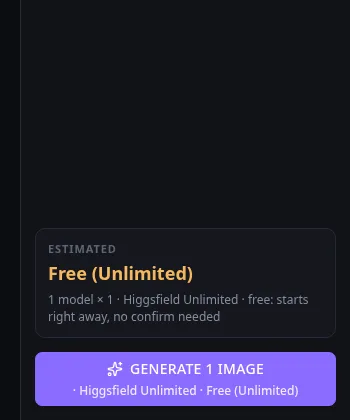
The first real test of that was an image on Higgsfield's Unlimited plan, run through the app. It left the Higgsfield balance unchanged and spent $0 on fal.
The Unlimited plan doesn't come through the MCP
On 3 October I switched Higgsfield over to its official MCP server, with prices from the MCP's own cost check before each job (v1.1.0).
That turned up a surprise of a different kind. Unlimited doesn't apply through the MCP. One Nano Banana Pro image at 1K cost 2 credits. So every MCP route is now priced as paid, with the credits on the button.
A browser route for the Unlimited plan stayed in the app as an opt-in setting, off by default. It's how the free images in the rest of this series were made.
I pick the provider, and it never switches silently
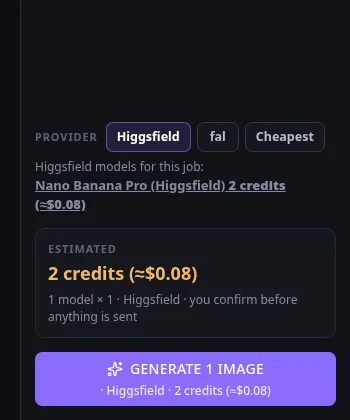
The same card added a global provider setting and a Higgsfield | fal | Cheapest toggle on each tool. The rule written into it was: "If the chosen provider can't do that job, say so in plain English and offer the other one. Never switch silently."
Subscriptions got their own label. ElevenLabs runs on my own plan. One 2-second sound effect used 22 plan credits and no extra money, so those routes say "Included in your ElevenLabs plan". When the credits run out, the tool offers fal instead of switching on its own.
Spend by job id, not by balance
On 5 October I learned something about shared accounts. The Higgsfield account isn't only used by Asset Forge. Other projects use it too.
During one motion-guide test, the balance dropped by more than the card had spent. 6.5 of those credits were my own image generation elsewhere, not the card's. So checking the balance before and after a job was the wrong test.
So spend tracking moved to job ids (v1.10.1). Every Higgsfield job id Asset Forge submits is logged, and the spend report only counts the account transactions that match one of those ids. The real checks now assert "our job ids cost 0 credits", never "balance before == after".
One badge for every price
By 6 October the app showed prices in four different styles: chips, button suffixes, route cards and so on. A usability card replaced all of them with one cost badge (v1.17.0). It has four forms: Free (Unlimited), a dollar price, plan credits, or demo.
It's a small change, but it means a price looks the same everywhere and I don't have to work out which kind of money a button is talking about.
The AI features follow the same rule
When the Assistant arrived (v1.8.0), it got the same rule as everything else. Anything paid shows a confirm card with the router's real cost, and the maximum it may spend on its own per conversation defaults to $0. Review all, the art critic, asks first above 10 pictures (v1.6.1).
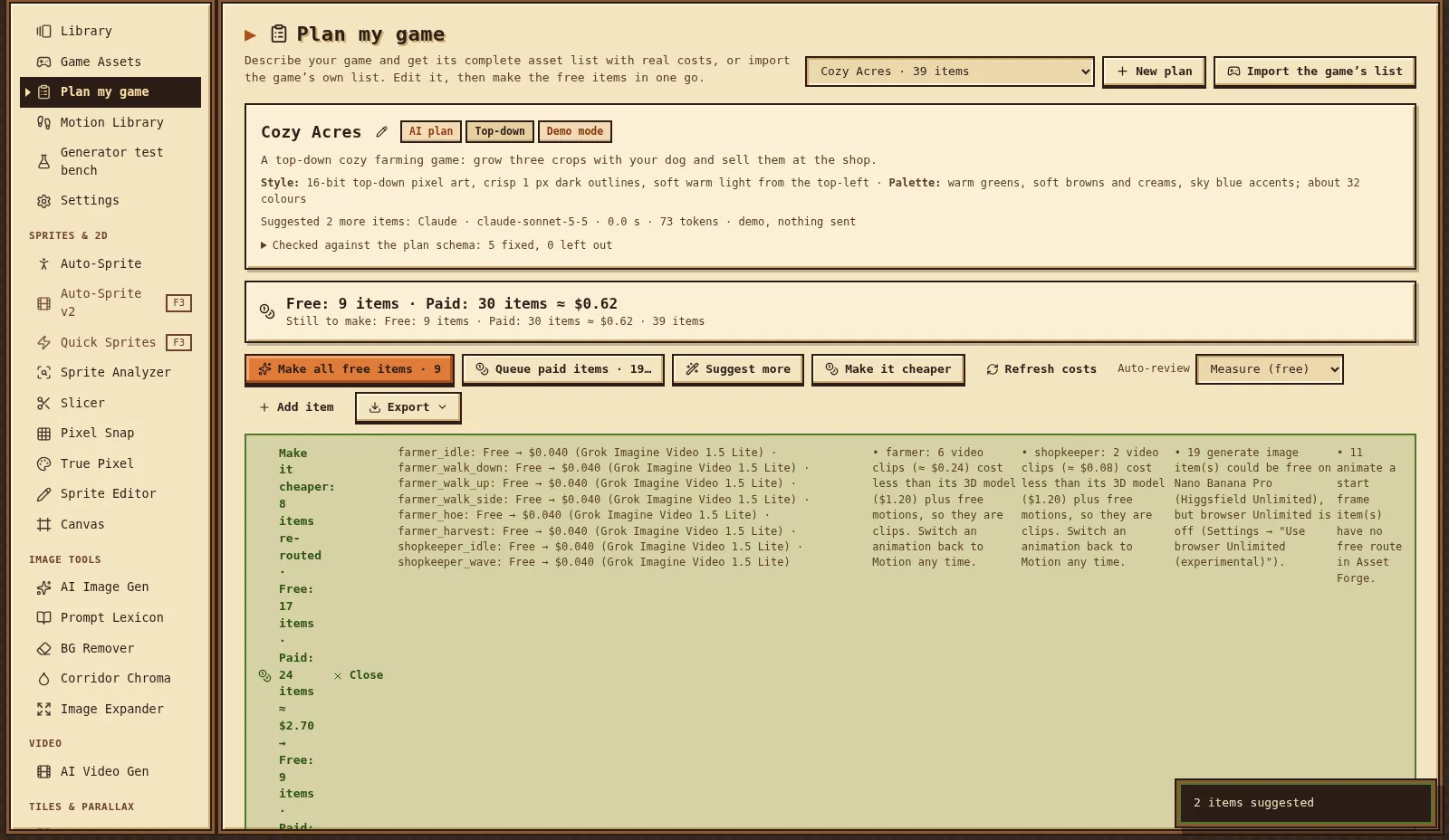
"Plan my game" goes a step further and offers to make a plan cheaper. In one test it moved eight character animations from 3D models ($1.20 each) to short video clips at $0.04 each, and said why.
What real checks cost
Most cards end with a real check: one run through the real providers, with a cap on what it may spend. These are the costs the cards reported themselves:
- the image tools' first real call: $0.028;
- the first drifter character, idle and walk: $0.64;
- terrain plus a parallax scene: $0.13 on fal, 0 Higgsfield credits;
- the audio tools: $0.0252 of a $1.50 cap;
- a 3D model from Meshy 7: $1.20;
- a Hunyuan 3D Pro model from front and back views: $0.825;
- two AI effect clips: $0.10;
- a talking NPC's lip sync: $0.19 of $1.00;
- a cutscene: $0.31 of $0.60;
- text to animation, two clips: $0.16 of $1.00;
- the Assistant's real check: $0.0032 of $0.50.
Quick Sprites, AI fill in the Canvas, the environment and creature generators, the 3D polish, the image viewer and the guides all passed their real checks for $0.
I don't have a reliable grand total. The shared spend ledger only starts on 5 October, and the per-card numbers above don't cover everything. So I'm not going to print one.
What went wrong
The typed-in caps were wrong in both directions. By 11 October the Higgsfield cap was 100 credits, with 90.8 already charged that session, while the real account had far more. So the app would have refused work I could afford. The fal cap had been raised to $10,000, which is no cap at all.
The old $5 cap stopped another project mid-job. My other game's art card used Asset Forge too, and it stopped at $4.994 of $5.00. I raised the cap by hand to keep it going, which is how it ended up at $10,000.
An accidental spend. A card testing ElevenLabs' v4 model sent 10,001 characters, expecting a refusal, because the model advertises a 10,000-character maximum. ElevenLabs accepted it and used 1,210 plan credits (no extra money). Asset Forge now enforces that limit itself.
Still in progress on 11 October
Two money cards were still running when I wrote this, and neither had merged. Asset Forge was still at v1.36.1.
Higgsfield first, always (HFDEF1). My instruction on 11 October was "Higgsfield should always be the default unless Higgsfield does not support the tool or function requirements." The card makes that one router rule, and when it has to leave Higgsfield, it says why in plain English with the fal price. Its real check ran one Unlimited job for 0 credits, counted by job id. But it has taken 13 runs so far, 9 of them stopped by my Claude usage limit, and its merge failed twice. The second time it found two real bugs on its own lane: a looping sound-effect request got an error instead of the fallback notice, and the ElevenLabs voice control was hidden under the new default.
Limits from the real accounts (LIMITS1). My instruction: "fal spend and higgsfield spend limits should be based on what is detected as the current spend and credit limit." The new code reads the live Higgsfield balance, fal's billing API and the ElevenLabs plan, and I set an allowance on top. One rule from the card: "No silent blocking on a stale number: a check that uses a detected limit must show its timestamp and offer Refresh."
fal's billing API refuses to answer for my key, because the key doesn't have billing permission. So for fal the app falls back to its own ledger and labels the number "estimated from our records". The card's own tests also found a real bug: when no dollar cap could be detected, fal work went through with no limit at all. That's fixed on the lane, but at the time of writing four older cost-guard tests were still red, and the merge was waiting behind HFDEF1's.
I'll update this post when both are merged. Until then, the caps described above are the ones the live app uses.